13 min read • Jun 15, 2026
How data flows in React
In React, data flows in one direction: downwards, from top to bottom. This is known as unidirectional data flow.
This design allows us to define data in a parent component and pass it down to its children. However, strictly passing data downwards does not cover every architectural scenario. As applications grow, components need to share data in various directions.
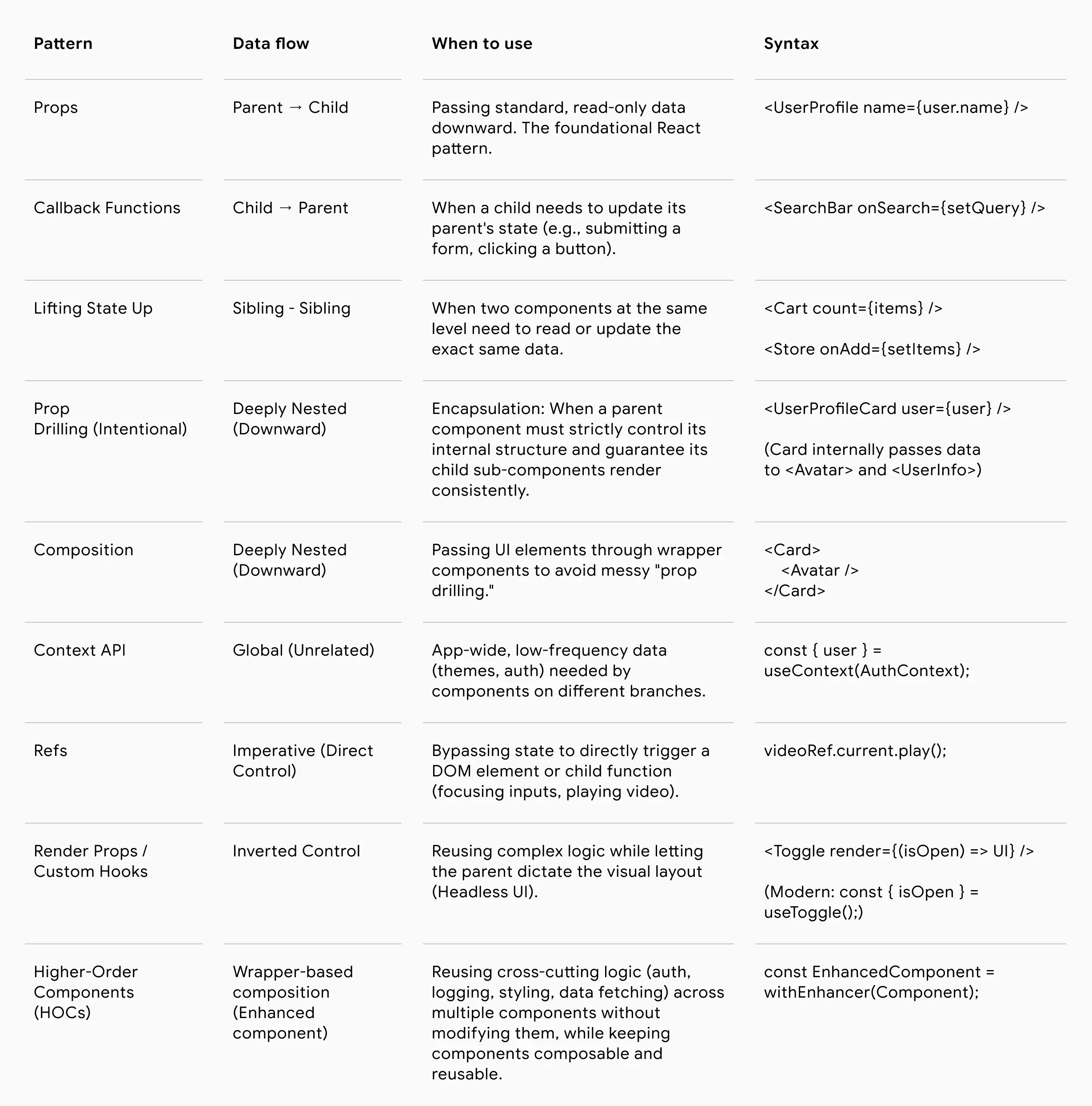
Here are the eight patterns for handling component communication in React:
- Parent to Child: Props
- Child to Parent: Callback Functions
- Sibling to Sibling: Lifting State Up
- Grandparent to Grandchild: Prop Drilling & Composition
- Unrelated Components: Context API & Global Stores
- Parent to Child (Imperative): Refs
- Inverted Control: Render Props
- Component Enhancement & Logic Reuse: Higher-Order Components (HOCs)
1. Passing Data from Parent to Child: Props
This is the default data flow model in React. The parent component defines the data (whether stateful or static) and passes it directly into the child component as an attribute.
The child receives this data as a read-only object called "props" (short for properties) and renders its UI accordingly.
For example, the parent defines the data and passes specific details to the avatar and user info components.
// Parent Component
function UserProfile() {
  const user = {
    name: "Jane Doe",
    role: "Software Engineer",
    avatarUrl: "/images/jane.jpg"
  };

  return (
    <div>
      <UserAvatar image={user.avatarUrl} altText={user.name} />
      <UserInfo name={user.name} role={user.role} />
    </div>
  );
}

// Child Components
function UserAvatar({ image, altText }) {
  return <img src={image} alt={altText} />;
}

function UserInfo({ name, role }) {
  return (
    <div>
      <h2>{name}</h2>
      <p>{role}</p>
    </div>
  );
}
2. Passing Data from Child to Parent: Callback Functions
Because React enforces downward data flow, a child cannot directly push a variable up to its parent.
To send data upward, the parent must define an updater function and pass that function down to the child as a prop. The child then executes that function, passing its own local data into the function as an argument, which updates the parent's state
For example, a reusable search bar component. The search bar manages its own typing state, but needs to send the final search query back up to the parent so the parent can filter a list of products.
// Parent Component
function ProductCatalog() {
  const [searchQuery, setSearchQuery] = useState("");

  const handleSearch = (query) => {
    setSearchQuery(query);
    // ... logic to fetch or filter products based on 'query'
  };

  return (
    <div>
      {/* Pass the callback down */}
      <SearchBar onSearch={handleSearch} />
      <p>Showing results for: {searchQuery}</p>
    </div>
  );
}

// Child Component
function SearchBar({ onSearch }) {
  const [inputValue, setInputValue] = useState("");

  return (
    <form onSubmit={(e) => {
      e.preventDefault();
      onSearch(inputValue); // Send data up to parent on submit
    }}>
      <input
        value={inputValue}
        onChange={(e) => setInputValue(e.target.value)}
        placeholder="Search products..."
      />
      <button type="submit">Search</button>
    </form>
  );
}
3. Sharing Data Between Siblings: Lifting State Up
Siblings cannot communicate directly with one another. To allow two sibling components to share and react to the same data, they need a mediator.
The state is moved (or "lifted") to their closest common parent. This parent component then manages the state and passes it down to both siblings via props, along with any necessary callback functions to update that state.
For example, a shopping cart. The ProductList needs to add items, and the Navbar needs to display the total item count. The state must be lifted to their common parent: StoreApp.
// Common Parent
function Store() {
  const [cartItems, setCartItems] = useState([]);

  const addToCart = (product) => {
    setCartItems([...cartItems, product]);
  };

  return (
    <div>
      {/* Sibling A: Only needs to read the length */}
      <Navbar cartCount={cartItems.length} />

      {/* Sibling B: Needs the function to update the data */}
      <ProductList onAddToCart={addToCart} />
    </div>
  );
}

function Navbar({ cartCount }) {
  return <nav>Total Items in cart: {cartCount}</nav>;
}

function ProductList({ onAddToCart }) {
  return (
    <button onClick={() => onAddToCart({ id: 1, name: "Wireless Mouse" })}>
      Add to Cart
    </button>
  );
}
4. Deeply Nested Components: Prop Drilling & Composition
When data needs to travel through multiple layers of components (e.g., from Grandparent to Great-Grandchild), two primary patterns emerge: prop drilling and component composition.
4.1 Prop Drilling
Prop drilling refers to the practice of passing props from a parent to a child, child to a grandchild, and so on, until the props reach the final destination.
This pattern is particularly useful when building a component that should control its own internal structure. For example, if we want UserProfileCard always to render both the Avatar and UserInfo components, we can encapsulate that logic inside the component. This ensures the card is always displayed consistently and prevents situations where it is rendered without required information (such as the user's name) or with unexpected additional components.
// Parent component
function Profile() {
  const user = {
    name: "Alice",
    role: "Admin",
    avatar: "/alice.jpg"
  };

  return <UserProfileCard user={user} />;
}

// Child component, receiving and sending data down to grandchildren
function UserProfileCard({ user }) {
  return (
    <div>
      {/* Grandchildren - final destination of the data */}
      <Avatar src={user.avatar} />
      <UserInfo name={user.name} role={user.role} />
    </div>
  );
}
However, if we don't care about a specific internal structure, passing the data through multiple components can make the code hard to use and maintain.
In cases where the middle components need to act as a wrapper and give developers the ability to decide which components to render inside the parent component, a component composition pattern is the better option.
4.2 Component Composition
The component composition pattern is commonly used to handle deep nesting. Instead of passing raw data through intermediate components, you pass child components as props (usually through the children prop). This allows deeply nested components to be defined at a higher level and provided with the data they need directly.
For example, when building a card component that acts as a wrapper around other components, the developer can decide which components should be rendered inside the card.
export default function UserProfile() {
  // User data that will be passed to child components
  const user = {
    name: "Alice",
    role: "Admin",
    avatar: "/avatar.png",
  };

  return (
    <div>
      <h1>My Profile</h1>

      {/*
        Card is a reusable wrapper component.
        The content inside Card is passed through the `children` prop.
      */}
      <Card>
        <UserAvatar avatar={user.avatar} />
        <UserName name={user.name} />
        <UserRole role={user.role} />
      </Card>
    </div>
  );
}

function Card({ children }) {
  return (
    <div className="rounded p-2">
      {/* Render whatever components are passed into Card */}
      {children}
    </div>
  );
}

function UserAvatar({ avatar }) {
  // Display the user's avatar
  return <img src={avatar} alt="User avatar" />;
}

function UserName({ name }) {
  // Display the user's name
  return <p>Name: {name}</p>;
}

function UserRole({ role }) {
  // Display the user's role
  return <p>Role: {role}</p>;
}
5. Unrelated Components: Global Communication
When components reside on completely different branches of the application tree but need to share the same data, the state must be moved outside the standard component tree. Context API is a native way of handling non-related component communication, while third-party libraries can be useful to handle more specific and advanced communication needs.
5.1 Context API
React’s native way to create a "bubble" of data at the top level. Any component within that bubble can consume the data directly without prop drilling. It is best suited for simple, low-frequency updates like UI themes, routing data, or logged-in user status.
For example, an authentication state. A user logs in, and completely separate parts of the app (like a profile dropdown in the header and a protected settings page) need to know whether the user is authenticated.
import { createContext, useContext, useState } from 'react';

// 1. Create the Auth Context
const AuthContext = createContext(null);

// Top Level App
function App() {
  const [currentUser, setCurrentUser] = useState({ name: "Jane", loggedIn: true });

  return (
    <AuthContext.Provider value={{ currentUser, setCurrentUser }}>
      <Header />
      <MainContent />
    </AuthContext.Provider>
  );
}

// Deeply Nested Component (Header > Navbar > ProfileDropdown)
function ProfileDropdown() {
  // Grab the data directly from the bubble
  const { currentUser, setCurrentUser } = useContext(AuthContext);

  if (!currentUser.loggedIn) return <button>Login</button>;

  return (
    <div>
      <span>Welcome, {currentUser.name}</span>
      <button onClick={() => setCurrentUser({ loggedIn: false })}>Logout</button>
    </div>
  );
}
5.2 Third-Party Global State Libraries
For complex, frequently updating data, third-party tools are preferred. Client State libraries (like Redux, Zustand, or Recoil) handle complex UI logic, while Server State libraries (like React Query or SWR) automatically handle caching, loading states, and background updates for API data.
6. Imperative Control: Refs
React is inherently declarative (the UI reacts to state changes). However, sometimes a parent needs to directly trigger an action inside a child component, bypassing the standard state flow.
Using the Refs pattern (useRef, forwardRef, useImperativeHandle), a parent can get a direct reference to a child’s DOM node or invoke a specific function exposed by the child.
Note that manually overriding a component makes the code harder to track, test, and maintain. So React recommends using this pattern sparingly (e.g., managing focus or triggering animations).
As an example we can use a custom Video Player. The parent component wants a button to forcefully play or pause the video, bypassing standard state logic to directly trigger the browser's native <video> DOM API.
import { useRef, forwardRef, useImperativeHandle } from 'react';

// Child component holding the actual <video> element
const VideoPlayer = forwardRef((props, ref) => {
  const videoRef = useRef(null);

  // Expose specific imperative methods to the parent
  useImperativeHandle(ref, () => ({
    playVideo: () => videoRef.current.play(),
    pauseVideo: () => videoRef.current.pause(),
  }));

  return (
    <video ref={videoRef} src="/media/sample-video.mp4" />
  );
});

// Parent component
function App() {
  const playerRef = useRef(null);

  return (
    <div>
      <VideoPlayer ref={playerRef} />
      <div>
        <button onClick={() => playerRef.current.playVideo()}>Play</button>
        <button onClick={() => playerRef.current.pauseVideo()}>Pause</button>
      </div>
    </div>
  );
}
7. Inverted Control: Render Props
Sometimes you need a component to manage complex state and logic, but you want the consumer (the parent) to dictate exactly how that logic is visually rendered. This concept is the foundation of "Headless UI."
The Render Props pattern achieves this by having the parent pass a function to the child component. The child executes this function, passes its internal state and behavior into it as arguments, and renders the resulting UI.
This pattern is highly effective for building reusable UI components. For example, a headless Modal component can internally manage complex accessibility requirements—like open/close states, focus trapping, and keyboard interactions—while using a render prop to let the developer completely customize the Modal's visual layout, styling, and animations.
Let’s examine a headless Modal. The HeadlessModal component manages the open/close state and keyboard interactions (like closing on "Escape"), but it delegates 100% of the visual rendering back to the parent component.
import { useState, useEffect } from 'react';

// Child Component: Handles ALL logic and accessibility, Zero UI
function HeadlessModal({ render }) {
  const [isOpen, setIsOpen] = useState(false);

  const openModal = () => setIsOpen(true);
  const closeModal = () => setIsOpen(false);

  // Keyboard interaction: Close modal on 'Escape' key
  useEffect(() => {
    const handleKeyDown = (e) => {
      if (e.key === 'Escape' && isOpen) {
        closeModal();
      }
    };

    document.addEventListener('keydown', handleKeyDown);
    return () => document.removeEventListener('keydown', handleKeyDown);
  }, [isOpen]);

  // Imagine complex focus-trapping logic happening here as well...

  // Pass the state and actions back out to the parent
  return render({ isOpen, openModal, closeModal });
}

// Parent Component: Handles ALL UI, Zero complex logic
function App() {
  return (
    <HeadlessModal
      render={({ isOpen, openModal, closeModal }) => (
        <div className="p-4">
          {/* The parent decides what triggers the modal */}
          <button onClick={openModal} className="bg-blue-500 text-white p-2">
            Delete Account
          </button>

          {/* The parent decides exactly how the modal looks and animates */}
          {isOpen && (
            <div className="fixed inset-0 bg-black bg-opacity-50 flex items-center justify-center">
              <div
                className="bg-white p-6 rounded shadow-lg"
                role="dialog"
                aria-modal="true"
              >
                <h2 className="text-xl font-bold mb-4">Are you absolutely sure?</h2>
                <p className="mb-4">This action cannot be undone.</p>

                <div className="flex gap-4">
                  <button onClick={closeModal} className="bg-gray-200 p-2">
                    Cancel
                  </button>
                  <button
                    onClick={() => {
                      alert("Account deleted!");
                      closeModal();
                    }}
                    className="bg-red-500 text-white p-2"
                  >
                    Confirm Delete
                  </button>
                </div>
              </div>
            </div>
          )}
        </div>
      )}
    />
  );
}
8. Component Enhancement & Logic Reuse:** Higher-Order Components (HOCs)
When we want an abstraction that allows us to define logic in a single place and share it across multiple components, a Higher-Order Component (HOC) is a useful pattern.
A Higher-Order Component is a function that takes a component and returns a new component. Rather than modifying the original component, it composes it by wrapping it inside another component that adds additional behavior or presentation.
For example, suppose we have a component that displays user information, and we want to render it inside a reusable card UI. We can create a Higher-Order Component that wraps any component with a card container:
// Higher-Order Component that adds a card wrapper
function withCard(WrappedComponent) {
  // Return a new component
  return function NewComponent(props) {
    return (
      // Add shared styling and layout
      <Card>
        {/* Render the original component and forward all props */}
        <WrappedComponent {...props} />
      </Card>
    );
  };
}

// Component responsible for displaying user information
function UserInfo({ name }) {
  return <h1>User: {name}</h1>;
}

// Create a new component by wrapping UserInfo with the HOC
const UserInfoCard = withCard(UserInfo);

// Usage
<UserInfoCard name="John" />;
In this example, withCard takes the UserInfo component and returns a new component, UserInfoCard, that renders the original component inside a styled card. This allows us to reuse the card-wrapping logic across multiple components without duplicating code
Summary
In React, data inherently flows in one direction: downwards from parent to child. While this unidirectional model makes it highly predictable to pass read-only Props into child components, applications quickly grow beyond this basic structure. As the app scales, developers frequently encounter architectural scenarios where data needs to move upwards, sideways, or jump across the component tree entirely.
To manage this localized data flow, React relies on a few core strategies. When a child needs to send data back up, parents pass down Callback Functions for the child to execute. If siblings need to share data, developers use a pattern called Lifting State Up to move the shared data to their closest common parent. For deeply nested components, passing data layer by layer can lead to messy Prop Drilling, making Component Composition—passing actual components as props—a much cleaner alternative.
For more complex architectures, developers must look beyond the immediate component tree. Unrelated components can access shared global state through the native Context API or third-party libraries, bypassing standard prop passing entirely. Finally, for specialized UI scenarios, developers can use Refs to gain direct, imperative control over a child component, or use the Render Props pattern to build "headless" components that internally manage complex logic and accessibility while letting the parent completely dictate the visual layout.
In addition to these patterns, Higher-Order Components (HOCs) provide a powerful way to reuse and compose cross-cutting logic by wrapping existing components without modifying them directly, enabling shared behavior such as styling, authentication, logging, or data fetching across multiple parts of an application.
Component communication cheatsheet