11 min read • May 30, 2026
React fiber Architecture
When the browser parses an HTML document, it constructs the Document Object Model (DOM) tree. In a standard React application, in the initial phase, the DOM contains an empty root container element, typically defined as <div id="root">.
React’s goal here is to display, manage, and update the application’s user interface (UI) within this specific DOM node.
To do this, React needs to attach itself to the existing root DOM node, create an internal structure for the app, and update the DOM based on that structure.
Application Initialization And DOM Attachment
The integration process occurs sequentially. After building the initial DOM tree structure, the browser downloads and executes the bundled JavaScript. The JavaScript engine executes the initialization statement:
ReactDOM.createRoot(document.getElementById("root")).render(<App />);This invocation tells React which DOM element it should manage. In other words, executing createRoot initializes React and attaches it to the DOM, making the engine ready to render and update the UI inside the existing DOM. React handles this work using two primary phases: Render and Commit.
Understanding React’s Rendering Phase
Do not confuse React’s rendering phase with the browser actually painting or updating anything on the screen. In React, “rendering” means executing component functions to calculate what the user interface (UI) should look like. This entire process is strictly computational and occurs completely in memory before the browser displays or modifies anything on the screen.
React triggers a rendering phase under two conditions:
- Either the page is loading for the very first time, called initial render, or
- A runtime change — such as clicking a button — requires a UI update.
The goal of the initial render is to determine what components should be displayed on the screen and where each component should be placed within the application structure.
To achieve this goal, React relies on a core architectural block known as a Fiber.
What Is A Fiber?
A Fiber is an internal JavaScript object that represents a single unit of work. We can call “work” any task that React has to perform to display UI in the browser. For example, calculating a local state update, handling execution priorities, or evaluating a component’s JSX output.
When a unit of work is to calculate the JSX output of a component, or simply put, when a fiber represents a specific React component, it holds information about that component, such as state, props, and relationships to the rest of the application.
In fig. 1, you can see the simplified version of the Fiber type.
export type Fiber = {
  // Tag identifying the type of fiber.
  tag: WorkTag,

  // Unique identifier of this child.
  key: ReactKey,

  // The value of element.type which is used to preserve the identity during
  // reconciliation of this child.
  elementType: any,

  // The resolved function/class/ associated with this fiber.
  type: any,

  // The local state associated with this fiber.
  stateNode: any,

  // The Fiber to return to after finishing processing this one.
  // This is effectively the parent, but there can be multiple parents (two)
  // so this is only the parent of the thing we're currently processing.
  // It is conceptually the same as the return address of a stack frame.
  return: Fiber | null,

  // Singly Linked List Tree Structure.
  child: Fiber | null,
  sibling: Fiber | null,
  index: number,

  // Input is the data coming into process this fiber. Arguments. Props.
  pendingProps: any, // This type will be more specific once we overload the tag.
  memoizedProps: any, // The props used to create the output.

  // Effect
  flags: Flags,
  subtreeFlags: Flags,
  deletions: Array<Fiber> | null,

...
};
Fig. 1. You can check the full source code on GitHub
Ultimately, every operational task React needs to perform is translated into Fiber nodes. Together, they link to form an in-memory graph called the Fiber tree.
Therefore, React’s primary job during the initial render phase is to traverse the application, translate each component and task into an individual Fiber node, and connect those nodes to construct a tree. This tree, called a work-in-progress tree, will eventually hold all the necessary information for React to paint the UI.
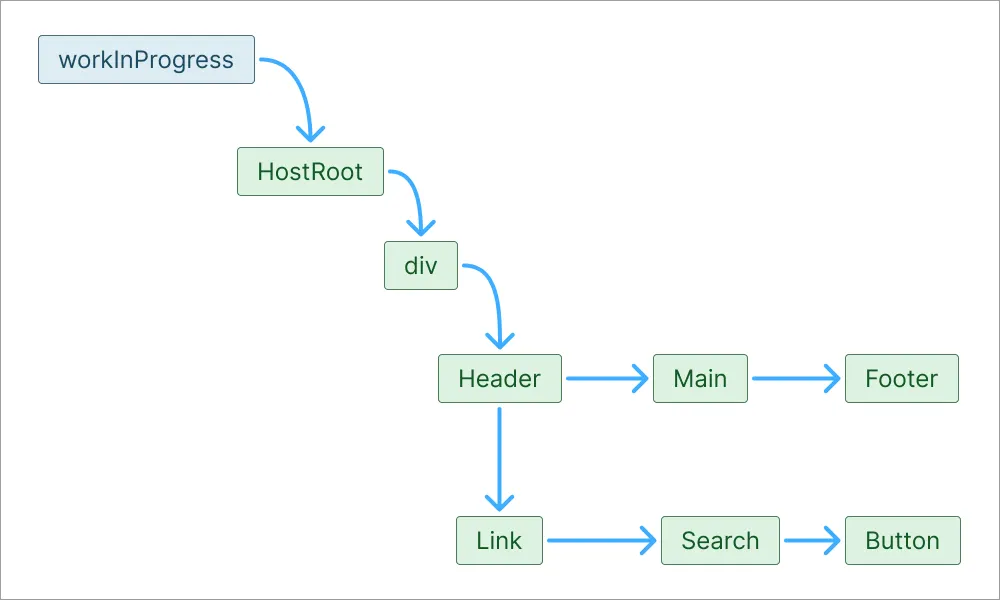
Say the browser has already displayed a page, and a user clicks the search bar. As feedback, the search bar’s UI should change to indicate it is in “active” state. But painting the whole page from scratch, only to update a single element, would be a waste of resources.
To avoid the extra work, React constructs another tree called the current tree, which represents the current UI in the browser. React then calculates the differences between the current and future UI, only changes what has to change, and leaves everything untouched.
For now, since we are in an initial render phase and there is nothing displayed in the browser yet, the current tree is only a <div id=”root”> node.
Fiber Root Node And Host Root Fiber
Before this entire tree-building process begins, React initializes a top-level object called the Fiber Root node.
While the Fiber Root node handles various high-level administrative tasks for the application lifecycle, for now, we are interested in it holding a direct pointer to the Host Root Fiber. This is a fiber that points to the current fiber tree. To be more precise, FiberRootNode’s current pointer points to a bare HostRootFiber object. This fiber represents the root container, but, since nothing is displayed yet, its child points to null.
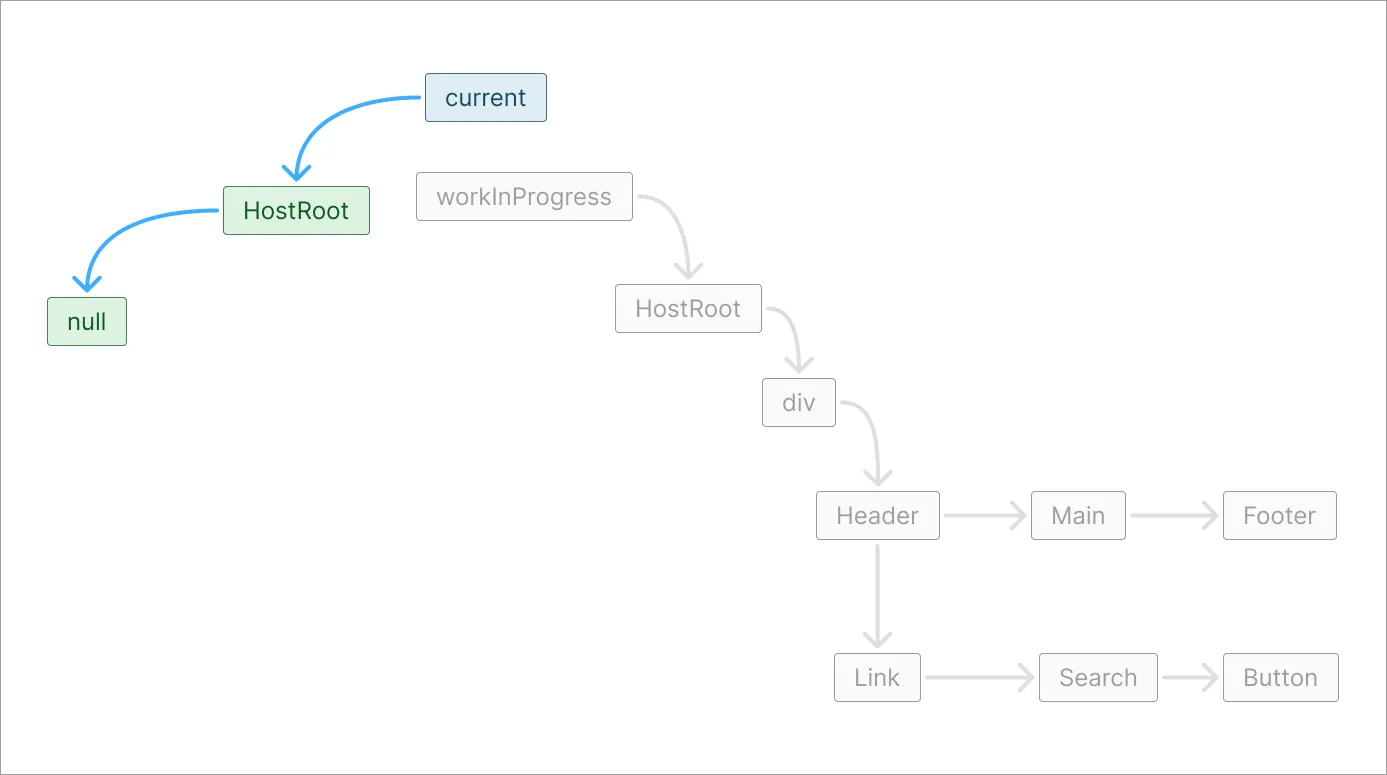
We can say that the Host Root Fiber serves as the first node of the Fiber tree, representing the host environment’s physical container.
Fiber Work Loop
Once this root foundation is established, React initiates the Fiber work loop — responsible for building the second, work-in-progress tree. This loop is the computational engine of the render phase — processing tasks sequentially to translate them into the finalized Fiber tree structure. This tree will be the work-in-progress tree, representing what the UI should look like.
During the work loop, React traverses the tree using a depth-first search strategy, navigating via child and sibling pointers. For each component node it encounters, the work loop executes a specific sequence of operations:
- Component Evaluation: React processes the unit of work based on its type. For functional components, it invokes the component function to evaluate its returned JSX.
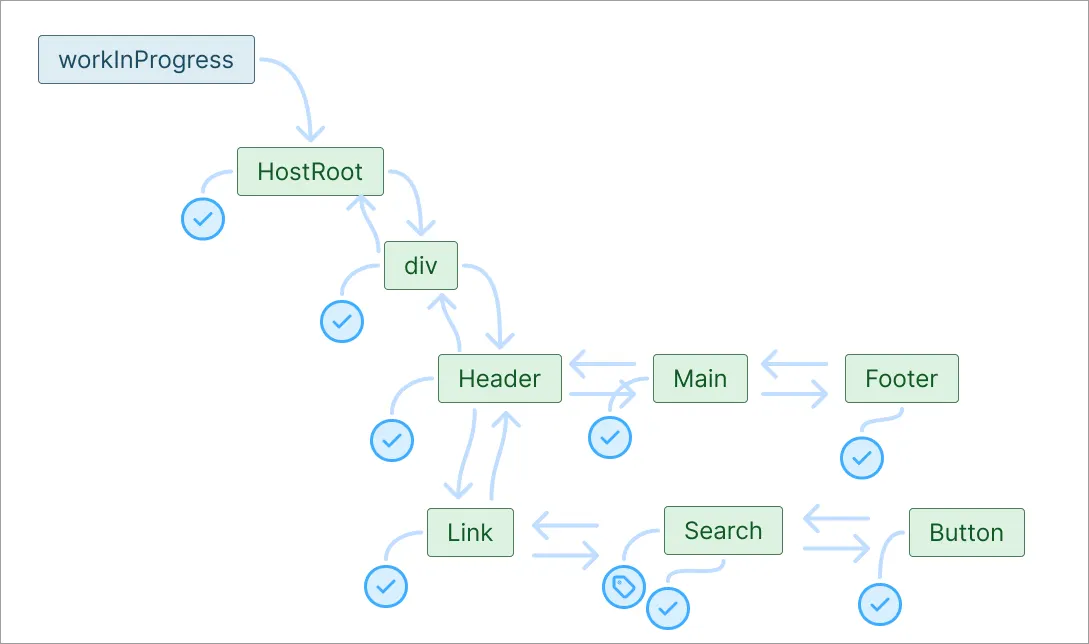
- Effect Compilation: As React computes the UI output, it tracks any necessary changes that must occur in the real DOM. It records these instructions directly onto the Fiber node as effects (such as a Placement flag during this initial render).
- Completion and Traversal: Once a Fiber node’s output and effects are calculated, React marks that specific unit of work as complete for the current render pass. The engine then advances to the next logical fiber in the tree.
This cycle repeats continuously until the work loop has evaluated every component in the application hierarchy. Because this entire process takes place strictly in memory, no changes have been made to the browser yet.
Once the tree traversal is complete, React exits the render phase and immediately enters the Commit Phase, where the collected effects are applied to the DOM in a single, synchronous pass.
All this workflow, happening inside the Fiber work loop, is called reconciliation.
Specifically, reconciliation is the act of React traversing the tree, calling your components, generating the new Fiber nodes, computing the “effects” (the differences or instructions), and comparing them to the current tree. The algorithm React uses for reconciliation is called the Fiber reconciler. Understanding how it works will help you connect all these concepts.
How Does Fiber Reconciler Work
There are two types of updates: high priority and low priority. When a component needs an urgent UI update, say typing in a search bar, it is marked as a high-priority update — when typing, the characters should be displayed on the screen immediately. For these kinds of tasks, React has 16ms.
Now, fetching search results can be a low-priority update since the user can wait some time before the results appear. For low-priority tasks, React can take up to 1 second.
Say, the user is typing in the search bar, presses the search button, and continues to type. So we’ll have a first — high-priority update, followed by a second — low-priority update, followed by a third — high-priority update. The third update will be delayed, meaning the browser will freeze until it fetches search results. This is because the main thread can only do one thing at a time. To address this problem, a fiber reconciler changes the order of those things: it can split the work into smaller units, prioritize these units, and direct the main thread, telling it what to focus on.
When the user clicks the search button, React recognizes that the update is not urgent. It marks the task as deferred and uses requestIdleCallback to ask the main thread to notify React when there is free time available. Once the main thread becomes idle, it signals React to begin the work loop and process the update.
The working loop makes this process pausable by knowing what the next thing to do is, and how much time the main thread has remaining. It allows React to make some work, go back to the main thread, check remaining time, and if time is available, continue working.
Scheduler
Remember, React needs to take care of high-priority updates stuck because of low-priority updates. To handle this, React uses a task manager called the scheduler. Its job is to accept callbacks, order them by priority, decide when they are ready to run, and execute them in small chunks so the browser can still respond to input and paint the screen You can read more about the scheduler here
The scheduler assigns different priorities to the fibers, for example:
- synchronous — needs to happen immediately
- high — needs to happen quickly
- low — scheduled as a later update
If a high priority jumps before the low priority, even if processing the low priority has already started, React will throw away all work and start working on the high priority to commit it as soon as possible.
Building The Work-in-progress Tree
React creates a work-in-progress tree by cloning fibers from the current tree, starting from the host root. As it traverses the tree, React processes updates and checks whether the state or props have changed. If a component needs to update React marks that fiber with flags indicating what changes need to be done. These changes, then, are collected in a list called the effect list.
React continues traversing the tree, and reuses fibers when possible by cloning them into the work-in-progress tree. This saves time and memory.
React also goes back to the main thread to check if it has any other work to do. In our example, the main thread has — fetching the search results, but knows it has a low priority, so let's React continue its job of traversing the tree.
When the child items are updated, and React has added flags, indicating a change, React marks these components as complete and goes up to the parent to mark them complete as well. When React marks the host root fiber as complete, the work is done, and React sets the work-in-progress tree as a pending commit.
Committing Changes To The DOM
The committing phase can not be paused because it could result in a broken UI. So React will check if the main thread has time to commit; if not, it will use the requestIdleCallback again and wait.
In the commit state, React traverses the work-in-progress tree looking for the effect flags it generated during the render phase. When it finds one, it executes the corresponding DOM operations:
- Deletions: If a Fiber node is marked for deletion, React physically removes the associated element from the DOM and cleans up any attached references.
- Placements: If a node is marked for placement, React uses the host environment’s native API (like
document.appendChildorinsertBefore) to insert the new element into the DOM. - Updates: If a node has an update flag, React modifies the existing DOM element.
The moment this phase is finished, the browser DOM is fully updated and is ready to reflect the new UI state.
Remember that React holds a pointer called the FiberRootNode, which points to the current tree — what is currently on the screen. Up till now, the current tree still represented the old UI, while the work-in-progress tree represents the new UI. React now flips the switch: it updates the FiberRootNode to point to the work-in-progress tree, and the work-in-progress tree now officially becomes the new current tree.
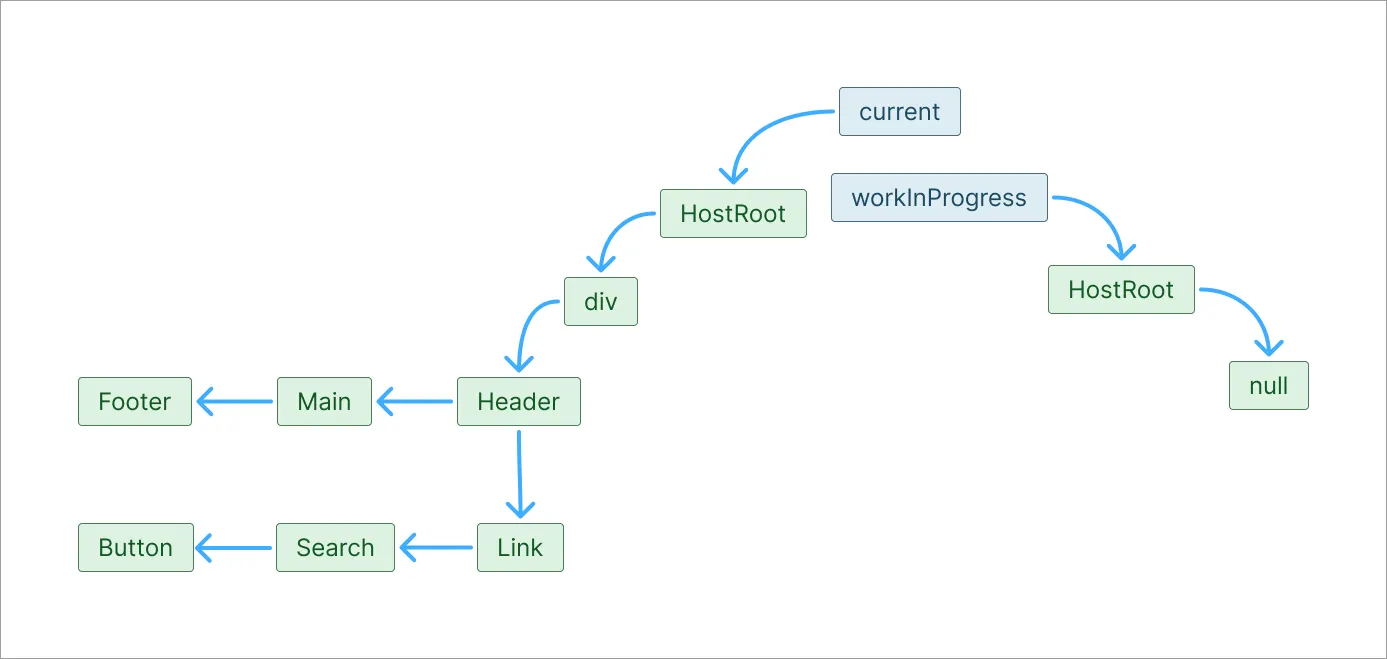
The old tree becomes a new work-in-progress tree, ready to be updated on the next render cycle.
Further Reading
You can read about the scheduler on this website. Check the fiber source code on GitHub.